
Roulette Strategy Simulator
Have a roulette system in mind and want to see how it might perform over time? The Roulette Strategy Simulator offers a practical way to explore it. Evan Carrington’s Casino Ideal tool lets you put a betting idea through hundreds or even thousands of virtual spins and track changes to your bankroll, without spending a cent. Before trying a plan at a live table with real money, use the simulator to put its rules through their paces and decide whether you want to explore the approach further.
Roulette Strategy Simulator
Place at least one bet on the table before running the simulation.
Test Summary ?
Balance Trend ?
No balance trend to show yet.
Result Per Spin ?
| Spin | Number | Status | Bet | Payout | Balance |
|---|
Spin results will appear here once available.
Simulation History ?
| Test | P/L | ROI | Balance |
|---|
No simulation history to show yet.
Set Up the Simulator
Setting up a test takes about thirty seconds. Pick a roulette variant, enter the number of spins to model, set your starting bankroll, and choose a betting system. Once you’ve entered these details, the simulator processes your settings and displays the results.
Select a Roulette Version

The simulator offers three roulette versions commonly found in online and land-based casino settings. Your choice matters because the different wheel layouts give the house different mathematical edges.
- European Roulette: This version is generally the best choice for odds among the three options. Its single-zero wheel gives it the lowest house advantage of the three.
- American Roulette: This familiar version has a double zero. The extra green pocket increases the house edge, lowering a player’s chances of winning compared with European Roulette.
- Triple Zero Roulette: As its name suggests, this layout has a third zero pocket. That extra pocket substantially increases the house advantage, making this the toughest of the three versions in which to finish ahead.
Choose the Number of Roulette Spins
Set the length of your test here. You can simulate anywhere from 10 to 1,000 spins.
More spins can show more clearly how a strategy behaves over time, including hot streaks and cold runs. A shorter session is useful for a quick first look at a new idea.
A smaller test can offer an initial impression. If the results catch your interest, raise the spin count to see how the system fares over a longer run.
Starting Balance
This is the virtual bankroll for your simulation. Choose a starting balance from 50 EUR to 100,000 EUR.
Systems that increase stakes after losses, such as the Martingale, need a larger starting balance. More funds can give the virtual bankroll room to withstand a losing streak before the test ends.
The simulation ends automatically if your balance reaches zero or drops too low to cover the next stake required by your chosen system.
Betting Strategy
This setting controls how the simulator places your bets. After each spin, it automatically adjusts the next wager according to the system you chose.
- Default (Flat Betting): This simple approach keeps the stake the same on every spin.
- Double after a loss (Martingale): After each loss, the next bet doubles.
- Double after win (Reverse Martingale / Paroli): This progression reverses the usual pattern, doubling the stake after a win in an effort to follow a winning streak.
- +X on loss, -X on win (D'Alembert): This gentler progression adds one unit to the bet after a loss and takes one unit off after a win.
- +X on win, -X on loss (Reverse D'Alembert): This flips the D'Alembert pattern: add one unit after a win and subtract one after a loss.
Since each system reacts differently to wins and losses, the same spin sequence can lead to quite different bankroll patterns as the simulation runs.
Place Bets and Run the Simulation
Placing wagers and starting a test is simple. The table uses a familiar online casino layout, so you can choose betting positions without learning a new design.
Choose Your Chips
Start by selecting a chip denomination. Choose as little as 0.10 EUR for a cautious test, or as much as 500 EUR to model a higher-stakes session.
Interactive Roulette Table
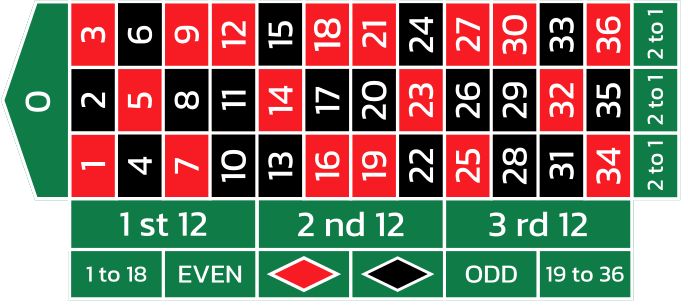
The interactive table offers all inside and outside bets. Switching to American or Triple Zero roulette updates the layout to include the extra pockets. Click the relevant position to place a wager, then add chips as you would in an online roulette game.
Run the Simulation
Once you’ve placed your wagers, click the large green "TEST" button. The simulator spins the wheel and applies your chosen betting rules from one spin to the next. The results shown reflect the settings you entered for that run.
Review Your Simulation Results

When the test is complete, review the figures to see how your selected strategy performed. They provide the main measurements for understanding how the system worked during the simulated session.
Test Summary
After the last spin, the summary brings together the test’s key figures.
- Profit/Loss
- ROI (Return on Investment)
- Win/Loss Rate
- Streaks (best and worst)
- Average Payout
- Max/Min Balance
These figures provide a quick snapshot of the system’s results and can help you decide whether to keep the rules, change them, or reconsider the approach.
Balance Trend Graph
The line graph tracks your bankroll from the first spin to the last. It helps you spot winning runs and sharp drops at a glance. A higher spin count gives a more complete picture of how your balance changed throughout the session.
Results by Spin
For a closer look, the tool logs every spin in detail. Check the stake, winnings, and balance after each one to see when a strategy started losing money or the session shifted direction.
Your Tests
Each simulation is saved automatically, so you can revisit earlier results and compare systems. Compare them using figures such as profit, ROI, or final balance.
You can also reopen past tests to review detailed statistics and graphs. This can help you refine the rules and find an approach that suits your intended playing style, without treating any one result as proof of future performance.
Why Try a Roulette Strategy Simulator?
Taking an untested strategy to a casino table can lead to avoidable losses. A simulator lets you explore betting systems in a virtual setting without risking real money, so you can look for weaknesses before considering a live session.
You can also compare strategies under the same simulated conditions and see how they fare across different sequences of results. Treat it as a practice space for exploring your ideas, not as a forecast of what will happen next.
Casino Ideal points out that no tool can guarantee a profit or ensure you’ll beat the house. A simulation may show patterns and inform your decisions, but chance and the house edge remain; virtual results do not predict future outcomes.
Random Card Generator
Suits to include
Card values to include
Select the DRAW CARDS button to deal your cards.